

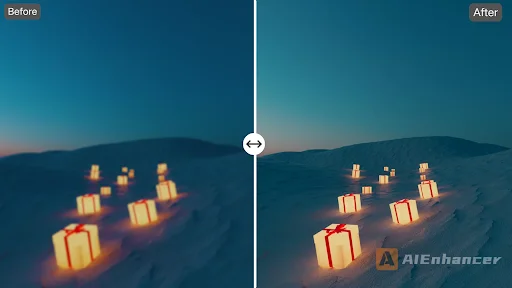
I still remember scrolling through my old travel photos and thinking, “Wow… these looked so much better in real life.” Some were slightly blurry, some had washed-out colors, and others were just… okay. You know that feeling when an image almost captures the moment, but not quite? That’s exactly where an AI photo enhancer steps in. It’s subtle, efficient, and sometimes, almost feels like cheating—but in a good way.
Breathing Life Into Ordinary Photos
Details You Didn’t Notice Before
I tried uploading a few shots from a rainy day trip. Honestly, I didn’t expect much. But AIEnhancer analyzed textures, shadows, and light in a way that made puddles shimmer and raindrops almost tangible. Faces that looked dull suddenly had clarity, backgrounds that felt flat gained depth. It’s weirdly satisfying to see what your camera “missed” all this time. It’s like rediscovering the scene all over again.
Old Photos That Feel New
I dug out some old family pictures, the ones with scratches, faded edges, and colors that time had muted. At first, I thought, “Yeah, this is hopeless,” but feeding them through AIEnhancer changed that perception. It restored colors subtly and erased damage without making the images look artificial. There’s this uncanny feeling when an old photo suddenly feels alive—like you can almost step into that moment again.
Dive deeper into meaningful reads—explore more now.
Removing Watermarks Without a Fuss
There’s always that one photo you find online that would be perfect—if only for the watermark. I was genuinely impressed by the watermark remover. It handled images that I thought would be impossible to clean, removing logos or text while keeping the original texture intact. It’s one of those little things that makes the tool feel surprisingly thoughtful.
Making Editing Actually Fun
Background Tweaks That Don’t Feel Fake
I’ve spent hours fiddling with shadows and gradients manually, often giving up halfway. AIEnhancer does it automatically, without making images scream “edited.” It subtly corrects background lighting, smooths uneven areas, and adjusts tones in a way that’s almost invisible, yet the image feels right. Honestly, I was expecting a more mechanical result, but it felt… alive.
Giving Blurry Shots a Second Chance
We all have photos ruined by motion or low light. I decided to test the unblur image feature, a bit skeptically. To my surprise, it actually worked. Some of my almost-discarded shots were transformed into images I felt comfortable sharing. Not every detail is perfect, but the overall effect is dramatic enough to make you reconsider tossing a photo.
Compressing Without Compromising Quality
This one caught me off guard. Large photos are always a headache—sluggish uploads, heavy storage—but most compression tools ruin the image. AIEnhancer compresses intelligently, keeping clarity, color, and vibrancy intact. It’s subtle, but when you’re managing dozens of high-res images, this little feature becomes a massive time-saver.
Why the AI Photo Enhancer Feels Different
Easy to Use, Hard to Break
Here’s something I appreciate: AIEnhancer isn’t intimidating. You don’t need a degree in editing. It guides you subtly, letting you tweak images or just hit “enhance” and see results. It’s the rare tool that feels accessible but still gives professional-level output.
Works Across Multiple Media
I experimented with personal photos, logos, and even a few video frames. It adapts remarkably well. Each type of media gets treated differently, with context-sensitive enhancements that feel intentional. You can see that someone—or some algorithm—thought about how these adjustments interact with the content.
Colors That Make Sense
Over-saturation is a common trap with enhancement tools, but AIEnhancer avoids that. Colors are vivid, but natural. Product photos, landscapes, and old memories all gain a subtle boost, enough to feel authentic. For me, this was the turning point where I realized AI can enhance without overstepping its bounds.
Helping Your Images Stand Out
Better images get noticed. Simple as that. I posted a few enhanced shots on social media, and they got more attention than similar photos I hadn’t enhanced. The AI photo enhancer subtly improves composition, lighting, and detail so your images feel like they were made for the audience, even if you didn’t spend hours adjusting them manually.
Integrates Smoothly Into Workflows
I’m not giving up my usual tools like Photoshop, but AIEnhancer fits seamlessly. I can enhance images quickly, then move them into my standard workflow for fine-tuning. It saves me time on repetitive corrections, which—honestly—is one of the biggest wins.
Beyond Basic Enhancement
Preserving Memories Digitally
AIEnhancer isn’t just about making images prettier; it’s about keeping memories alive. Old, damaged, or low-res images suddenly regain their clarity and vibrancy. For personal archives or creative projects, it feels like giving life back to each moment.
Encouraging Experimentation
One thing I didn’t anticipate: it nudges creativity. Subtle adjustments to texture, sharpness, or color often inspire me to explore new edits. The AI feels like a quiet collaborator, letting me experiment without fear of ruining a photo.
Professional Quality for Everyone
Not everyone has fancy equipment or advanced skills, and AIEnhancer levels the playing field. Even casual users can achieve polished, professional-looking results. It’s democratizing photography in a subtle, very practical way.
Continuously Learning
The enhancements feel smarter over time. Subtle improvements become noticeable, almost like the tool understands what you want more intuitively. You don’t notice it at first, but over weeks of use, your workflow feels faster and results feel consistently better.
Saving Time and Effort
By intelligently enhancing images, AIEnhancer reduces the need for multiple shoots or laborious manual edits. Each shot becomes more useful, saving both time and mental energy. It’s not just about better images; it’s about efficiency in creating visual content.
Final Thoughts
AIEnhancer is one of those rare tools that quietly makes your life easier. From removing watermarks and restoring old photos to unblurring shots and enhancing color naturally, it consistently delivers results that feel deliberate and human. It’s not perfect—some images still need your touch—but it transforms the way you approach visuals. The AI photo enhancer doesn’t just improve photos; it changes how you experience them, turning ordinary snapshots into images worth sharing, revisiting, and remembering.
Strengthen your understanding with related posts worth exploring.