
The audiobook market is booming. Listeners are consuming more audio content than ever — on commutes, during workouts, while cooking dinner. But for most writers, educators, and content creators, producing an audiobook still feels out of reach.
A professional narrator costs thousands of dollars. A recording studio costs more. And if you try to record it yourself, you’re suddenly managing microphones, acoustic panels, editing software, and hours of retakes just to get one clean chapter.
That’s the old path. An AI audiobook generator is a completely different one — and it’s changing who gets to publish audio, how fast, and at what cost.
Why the Traditional Audiobook Process Breaks Down
Here’s the reality most self-published authors and content creators run into: the writing is the easy part.
Getting your book into audio format — the format that a growing segment of your audience actually prefers — requires a production pipeline that has nothing to do with your core skill as a writer. You either pay for it, learn it, or skip it entirely.
Most people skip it. That means a finished manuscript sits on a shelf in text form while potential listeners move on.
An AI audiobook generator removes every step in that pipeline except one: uploading your file.
What an AI Audiobook Generator Actually Does
At its core, an AI audiobook generator takes written text and converts it into natural-sounding narration using advanced speech synthesis. You upload a document, choose a voice, and the AI handles everything else — extraction, processing, pacing, and audio output.
What makes modern tools different from older text-to-speech readers is expressiveness. Today’s AI narration understands sentence rhythm, applies natural pauses at punctuation, and modulates tone based on context. The result doesn’t sound like a robot reading your words. It sounds like someone telling your story.
Tools like AIDubbing’s free AI audiobook generator support a wide range of file formats — PDF, DOCX, TXT, PPT, and even images — which means you can convert virtually any written content without reformatting first.
How to Create an Audiobook With AI: Step by Step
The entire process takes a few minutes, not a few weeks. Here’s exactly how it works.
Step 1: Upload Your Document
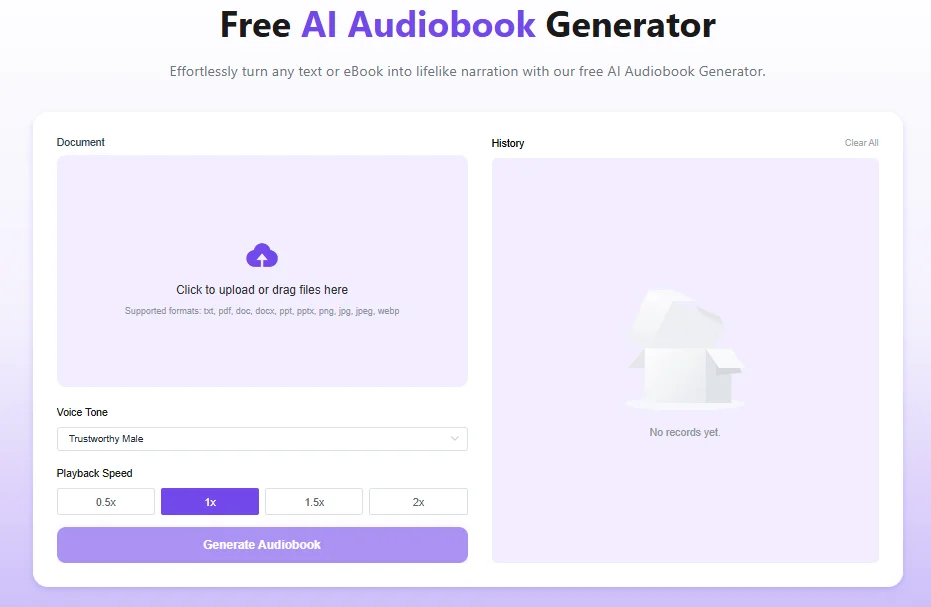
Navigate to the tool in your browser — no account, no installation, no setup. Click to upload or drag in your file. Supported formats include PDF, DOC, DOCX, TXT, PPT, PPTX, and common image formats like JPG and PNG.
The AI automatically extracts the text and prepares it for narration. You don’t need to copy-paste anything or reformat your manuscript.
What to keep in mind at this stage:
- Clean, well-punctuated text produces better narration. The AI reads what’s on the page, so a tidy document = smoother audio.
- For long books, you can upload chapter by chapter for easier editing and review.
- Images in PDFs are handled too — the system reads any embedded text it can extract.
Step 2: Choose Your Voice and Playback Speed
This is where your audiobook takes on its character. AIDubbing offers a diverse library of AI voices covering different genders, ages, and accent styles — from a warm, authoritative male narrator to a calm, composed female voice to a lively, expressive storyteller.
Pick the voice that fits your content’s tone. A business book lands differently with a confident, measured male voice. A children’s story comes alive with something playful and light. A self-help guide feels more intimate with a calm, close-up female narration.
You can also adjust playback speed before generating — 0.5x for slower, clearer delivery, up to 2x for faster-paced content. For most audiobook narration, the default 1x speed is right.
Pro tip: Generate a 2–3 paragraph sample in two or three different voices before committing to a full document. Voices that look similar on a list can feel very different once you hear them with your actual content.
Step 3: Generate, Preview, and Download
Hit “Generate Audiobook.” The AI processes your document and produces a finished narration — typically in seconds for shorter pieces, a few minutes for longer manuscripts.
Preview the audio directly in the browser. Listen for mispronunciations of proper nouns, unusual pacing in technical passages, or any spots where the tone feels off. If you need changes, make small edits to the source text and regenerate those sections.
When the narration sounds right, download the MP3 file. It’s yours immediately — no watermark, no expiration, fully cleared for personal and commercial use. That means you can publish it, sell it, distribute it on podcast platforms, or use it inside a course without any licensing concerns.
Who’s Using AI Audiobook Generators — and How
The range of people benefiting from this technology is wider than most expect. Here are the most common use cases, each with a specific workflow example.
Independent Authors and Self-Publishers
For a self-published author, a professional audiobook recording used to mean either a $3,000–$5,000 investment in a narrator or the steep learning curve of recording and editing it yourself. Neither option is realistic for most indie writers.
An AI audiobook generator makes audio publishing accessible to anyone with a finished manuscript. Upload the file, select a fitting narrator voice, and generate a complete audiobook in the time it used to take just to brief a voice actor.
Real workflow: A self-published novelist uploads each chapter as a separate DOCX file, uses a warm male voice for a consistent narrator identity across the book, and assembles the final MP3s into a full audiobook ready for distribution — all without leaving the browser.
E-Learning Developers and Online Educators
Course creators face a particular challenge: written lessons need to become audio, and they need to stay updated as content evolves. Re-recording every time a module changes is unsustainable.
With an AI audiobook generator, updating audio is as simple as editing the source document and regenerating. No studio booking. No scheduling a narrator. No editing session.
For multilingual courses, the advantage compounds. Upload the same content in different languages and generate narrations for each — expanding your audience without multiplying your production costs.
Real workflow: An online educator converts each lesson PDF into a narrated audio file at the end of each week. Students who prefer listening over reading can access every module in audio format, which drives both accessibility and course completion rates.
Marketers and Content Teams
Marketing teams are sitting on enormous libraries of written content — white papers, case studies, product guides, blog posts — that most people will never read in full. Audio changes the equation.
Converting that written content into audiobook narration opens up new distribution channels: podcast feeds, audio newsletters, in-app audio content. Content that used to reach only dedicated readers now reaches commuters, multitaskers, and anyone who consumes content primarily through headphones.
Real workflow: A B2B marketing team converts their quarterly industry report into audio, publishes it as a podcast episode, and drives 40% more engagement than the PDF version generated in previous quarters.
Students and Lifelong Learners
Not every reader absorbs information best through text. For students juggling heavy course loads, dense reading assignments can feel like an uphill battle — especially when time is tight.
Converting lecture notes, textbook chapters, or study guides into audio creates a flexible study format that works on the go. Listen during a commute. Review a chapter during a workout. Absorb material in ways that fit a real schedule, not an ideal one.
The AI audiobook format also improves retention for auditory learners — a segment that traditional education has historically underserved.
Real workflow: A college student uploads weekly reading assignments as PDF files every Sunday, generates audio versions, and listens through them during their daily commute — arriving at class already familiar with the material.
Podcasters and Solo Producers
Not every podcast episode needs to be recorded live. Narrative-style shows, essays, written commentary, and documentary-format content are all formats where scripted narration works beautifully — and an AI audiobook generator handles the delivery.
For solo producers who write long-form content, converting the script to audio rather than recording it themselves saves hours of setup, recording, and editing time every week. The consistency of AI narration also means every episode sounds the same — no variation in mic placement, room noise, or vocal energy across episodes.
Real workflow: A solo history podcast producer writes detailed episode scripts, uploads them to the audiobook generator, and publishes polished narrated audio every week without ever touching a microphone.
What Sets a Good AI Audiobook Generator Apart
A few things separate genuinely useful tools from the ones that frustrate you after the first use:
Voice quality and expressiveness. The narration needs to sound human — not just clear. Natural pacing, expressive rhythm, and appropriate emphasis are what keep listeners engaged through long-form content.
Format flexibility. A tool that only accepts TXT files forces you to do extra work upfront. The best tools handle PDF, DOCX, PPT, and images out of the box.
No access barriers. Free should mean free. No trial accounts, no credit card walls, no hidden per-minute charges. AIDubbing’s tool is open immediately — paste your document and generate.
Commercial rights included. If you’re publishing or monetizing the audio, you need to know the output is actually yours to use. Every file from AIDubbing is royalty-free for commercial projects.
Conclusion
The gap between a finished manuscript and a published audiobook used to be wide — measured in dollars, weeks, and technical skills most writers don’t have.
An AI audiobook generator closes that gap entirely. Your content is already written. The narration is one upload away.
Try it free right now — upload your first document at AIDubbing’s AI Audiobook Generator and have a complete audio narration in minutes. No account. No cost. No compromise on quality.